1. Decide what “two hours” includes
Two hours away from home and two hours of fishing are different plans. Write down your departure time, travel each way, setup time and the time you must be back. The remaining time is the session you can compare with the forecast.
| Time | Activity | Minutes |
|---|---|---|
| 7:00–7:20 | Travel to the spot | 20 |
| 7:20–7:30 | Walk in and set up | 10 |
| 7:30–8:30 | Available fishing session | 60 |
| 8:30–8:40 | Pack up and return to the car | 10 |
| 8:40–9:00 | Travel home | 20 |
This is a hypothetical schedule, not a recorded outing. It leaves one hour to fish. If you want two full hours at the water, allow more time overall or choose a closer spot.
2. Check the place and the weather
Choose your fishing location and target species, and check that access is possible at the planned time. Read the official weather forecast for the whole outing, including travel and packing up. The National Weather Service recommends checking conditions before a fishing or boating outing and monitoring changes.
A high fishing score cannot make an unsuitable weather window usable. If weather or access rules rule out your chosen session, change the session or postpone it before comparing fishing indicators.
3. Read the window, then the reasons
The actual app screen below shows a suggested window of 05:52–07:52, a 7.2/10 score, pressure as the top boost and moon phase as the main concern. These are example app conditions, not today’s forecast and not the location or readings for the hypothetical schedule above.
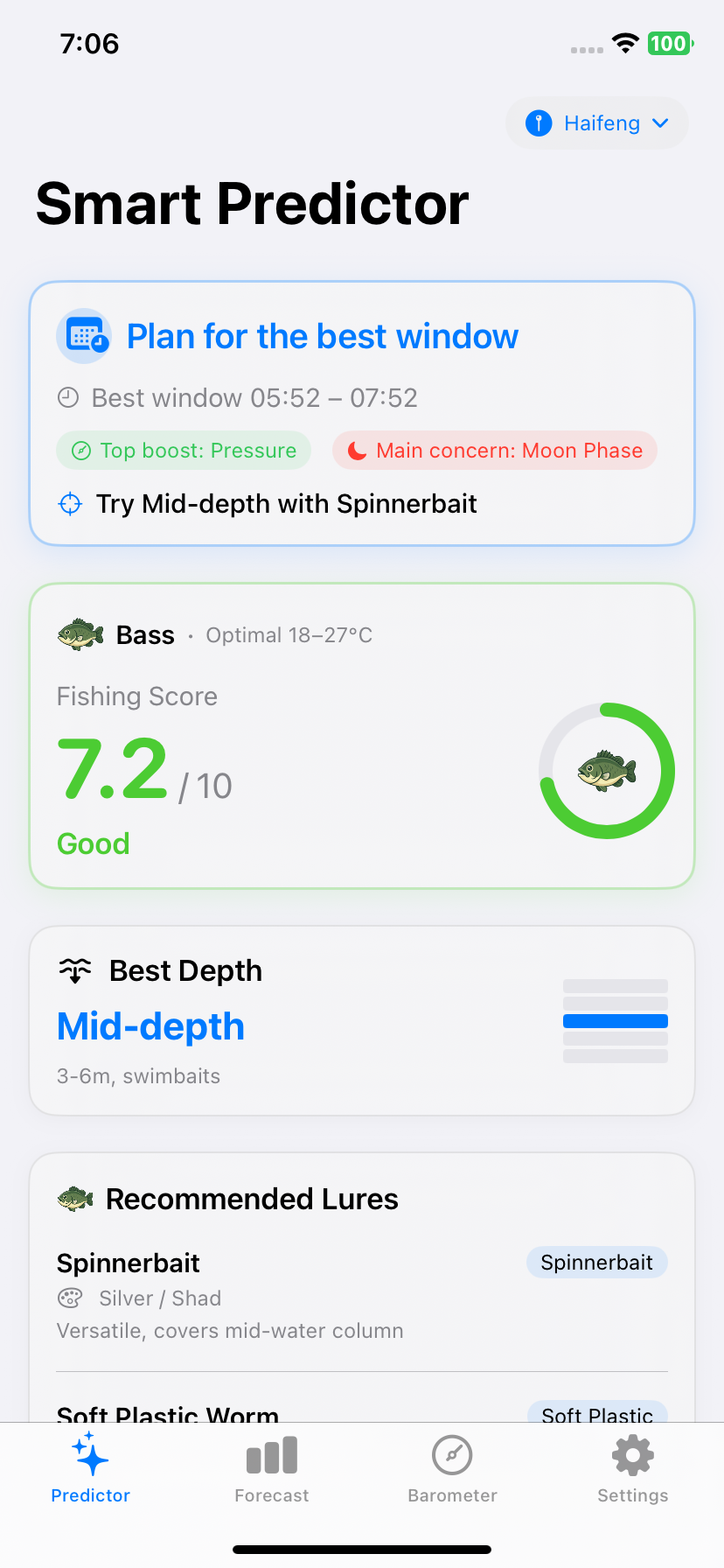
Use that screen in this order: confirm the location, compare the window with your available hours, then read the boost and concern. The 7.2 score does not mean a 72% catch probability. The lure and depth suggestion is a starting point to assess at the water, not a report of where fish have been detected.
For the two-hour-away example, a window ending at 7:52 would overlap the 7:30–8:30 fishing session by only 22 minutes. That overlap helps describe the plan; it does not measure the chance of a bite or make the remaining 38 minutes worthless.
4. Compare options you can actually use
| Situation | A useful next step |
|---|---|
| The suggested window ends before you arrive | Assess the hours you do have. Do not rush just to reach a model’s timing window. |
| Pressure looks favorable but wind is worsening | Inspect the hourly weather and official forecast before deciding whether the session is suitable. |
| Another day has a higher score | Consider it only if you are free then. A day you cannot fish is not an alternative session. |
| The score is similar at two spots | Compare travel, access and conditions you know locally; the score does not account for every practical difference. |
Use the pressure guide to interpret the trend and the solunar guide to check time conventions. The forecast method explains which inputs overlap.
5. Refresh and keep a fallback
Before departure, refresh the app and recheck the location, date, available hours and official forecast. If you use a Pro planning reminder, treat it as a prompt to revisit the plan: it reflects the latest refreshed forecast available to the app.
Keep a fallback that fits your time budget, such as a closer accessible spot or a later session. At the water, adjust to what you can observe. A useful outcome is a realistic plan, even when that means deciding to fish another day.
Common questions
Should I skip a trip if I miss the major solunar period?
A missed period alone is not enough to decide. Check the weather, your available hours and conditions at the location. A solunar window is one planning input, not a limit outside which fish cannot feed.
Do I need Pro to follow this plan?
You can start with current-day information. Pro adds the full seven-day outlook, Best Day This Week, saved-spot comparison, pressure outlook, deeper insights and local reminders. The travel and access checks apply either way.
Sources & context
The weather source supports checking conditions before and during an outing. The schedule and overlap calculation are illustrative planning examples; no catch outcome was measured.
Put the guide to work.
Plan your next outing with Best Fishing Times & Barometer for iPhone.
Get the iPhone app